
Build a TikTok ads pre-upload compliance workflow for your team in 5 steps. Your rejection rate isn't a creative problem - it's a process problem.
Why Does Your Team Keep Launching Ads That Get Rejected?

You've got talented people.
You've got great creative.
And somehow - somehow - you're still getting rejected ads, surprise strikes, and last-minute scrambles right before campaign launch.
Sound familiar?
Yeah. We hear this constantly.
Here's the honest truth: the problem usually isn't knowledge. Your team probably knows TikTok's policies (and whilst at TikTok - we also prided ourselves in knowing each and every single policy like the back of our hand! But still.. policies change so quickly too 😅) .
The problem is process - or more accurately, the lack of one. When compliance lives in one person's head, it becomes a bottleneck at best, and a catastrophic oversight at worst.
Someone's on holiday.
Someone's rushing to hit a deadline.
Someone assumed the other person had checked the AIGC toggle.
And just like that - Rejected. Again.
A pre-upload compliance workflow flips the whole dynamic - from reactive (fixing things after the rejection lands) to proactive (stopping violations from ever reaching the review queue in the first place).
Whether you're a solo creator, a small brand team, or a full-service agency with multiple clients running simultaneously, this is the framework that we think can help you in the process! 💪
📌 Updated 20 October 2026: I went back through this workflow and re-checked every spec against TikTok's own help pages. The Gate 2 numbers now match my full 2026 ad specs breakdown, and the AI and branded content checks in Gates 1, 3 and 4 now point to the posts that cover what changed this year.
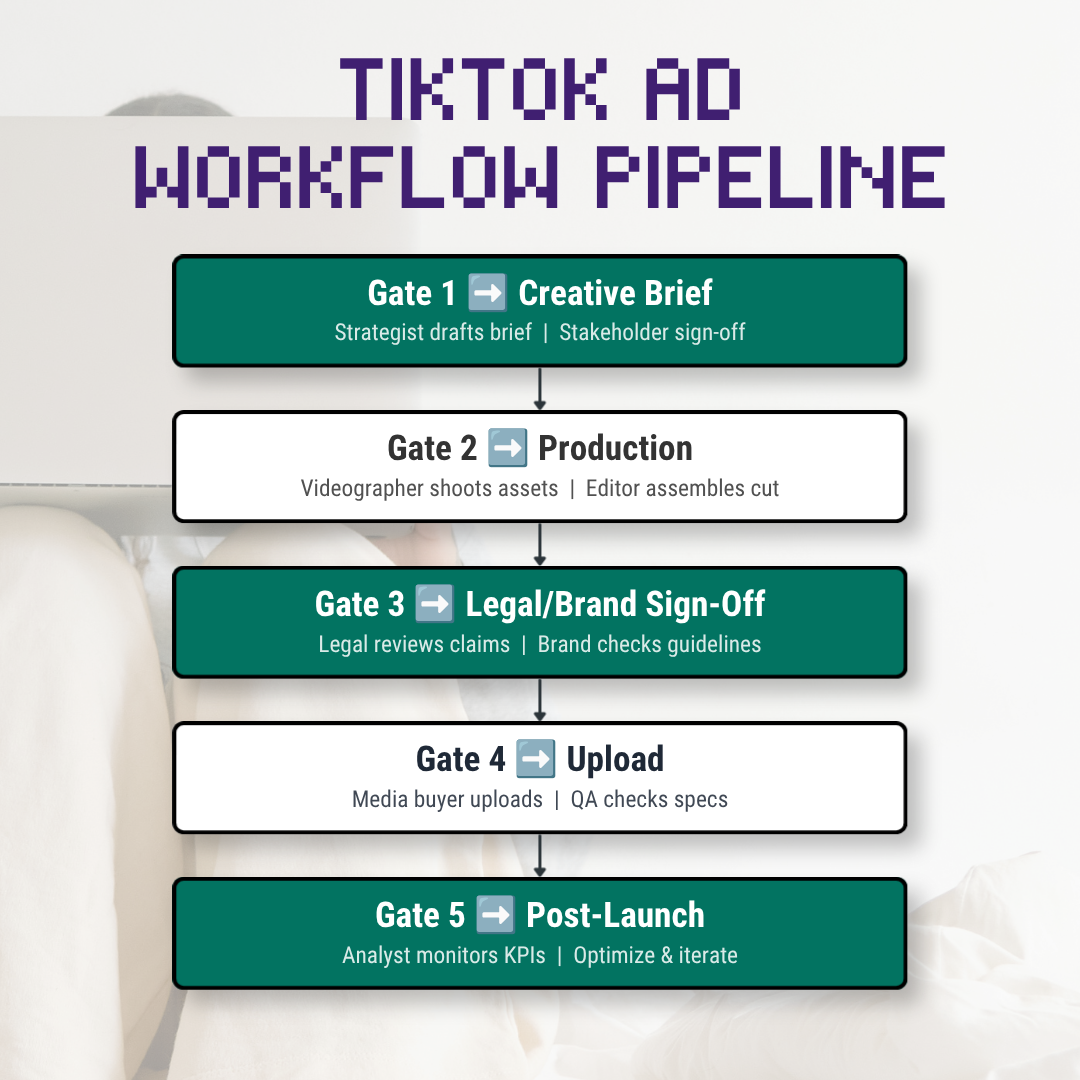
The 5-Gate Pre-Upload Compliance Framework ☝️
Think of your compliance process as a series of gates that every single creative has to pass through before it gets uploaded.
Each gate has a clear owner, specific checks, and a documented sign-off.
No gate, no launch. Simple as that.
Gate 1: Creative Brief Compliance - Catch It Before Anyone Picks Up a Camera 🫣

Owner: Account Manager / Campaign Strategist
When: Before any creative production begins
This is the most underused gate in the entire process - and it's the one that saves you the most money. A compliance check at the brief stage costs nothing. A compliance check after production - when you're re-shooting, re-editing, and re-submitting - costs everything.
What Should You Check at the Brief Stage?
Product category check:
📍 What category does this product fall in?
📍 Does it need special documentation, restricted targeting, or category-specific claim language? Products and services like banking/finance, healthcare and pharmacy, fitness/wellbeing are always at risk of being more scrutinized than say.. an ad selling furniture 🤷🏻♀️
Claim language framework: For every claim your ad will make, you need to know:
📍 Is this claim prohibited? (No "guaranteed results," no unsubstantiated superlatives)
📍 Is this a restricted claim that needs substantiation? (Health benefits, financial returns)
📍 What's the compliant version if the original doesn't pass? Build the fallback into the brief - not into the appeal
Talent and faces: Are real people appearing in the ad? If yes:
📍 Flag public figures immediately - their consent requirements are stricter. In addition - any images of known current, past political figures - it will likely be flagged. Even if there is no political intention behind your advertisement.
📍 Flag anyone under 18 - there are hard rules here. As long as there is someone who looks young enough to be clocked as under 18.. time to review your talent pool 🫣
Music selection:
📍 What audio are you planning to use? Make sure it is clear and not muffled!
📍 Is the track available in TikTok's Commercial Music Library (CML)?
📍 If using original or external music: does your commercial licence explicitly cover paid TikTok ads?
AI content flag:
📍 Are AI-generated visuals, voiceovers, or avatars going into this creative?
📍 Flag it at brief stage so the AIGC toggle and in-creative disclosure are designed in - not retrofitted in post when everyone's panicking. The rules are broken down in our AIGC disclosure guide
Gate 2: Production Compliance - Build It Right the First Time 🫡
Owner: Creative Lead / Producer
When: During and immediately after production
Once production kicks off, compliance shifts to technical execution. This gate exists to make sure what's being built will actually pass - before it ever hits the upload queue.
What Format and Spec Checks Need to Happen Before Delivery?
✅ Aspect ratio: 9:16 vertical is the one to use. 1:1 and 16:9 are accepted too, but vertical is the native format
✅ Resolution: minimum 540×960px for vertical (640×640px square, 960×540px horizontal). Export at 1080×1920px anyway, because minimums pass the upload check and then look soft in the feed
✅ File format: TikTok's in-feed spec page accepts .mp4, .mov, .mpeg, .3gp and .avi. I still export H.264 MP4 as a house preset, but that's a habit and not a TikTok requirement
✅ File size: 500MB or under
✅ Duration: 5 to 60 seconds. The uploader will accept longer files, but TikTok's ad policy sets the minimum at 5 seconds and the maximum at 60, so a longer file passes upload and then fails review
✅ Audio: it has to be there, and it can't be muffled or unclear
✅ Frame rate: TikTok doesn't publish a requirement for standard video ads, so stick to a standard rate (24, 25, 30 or 60) and avoid variable frame rate exports
📊 TikTok Auction In-Feed Ads specifications and Ad Format and Functionality policy
Safe Zone - No Excuses
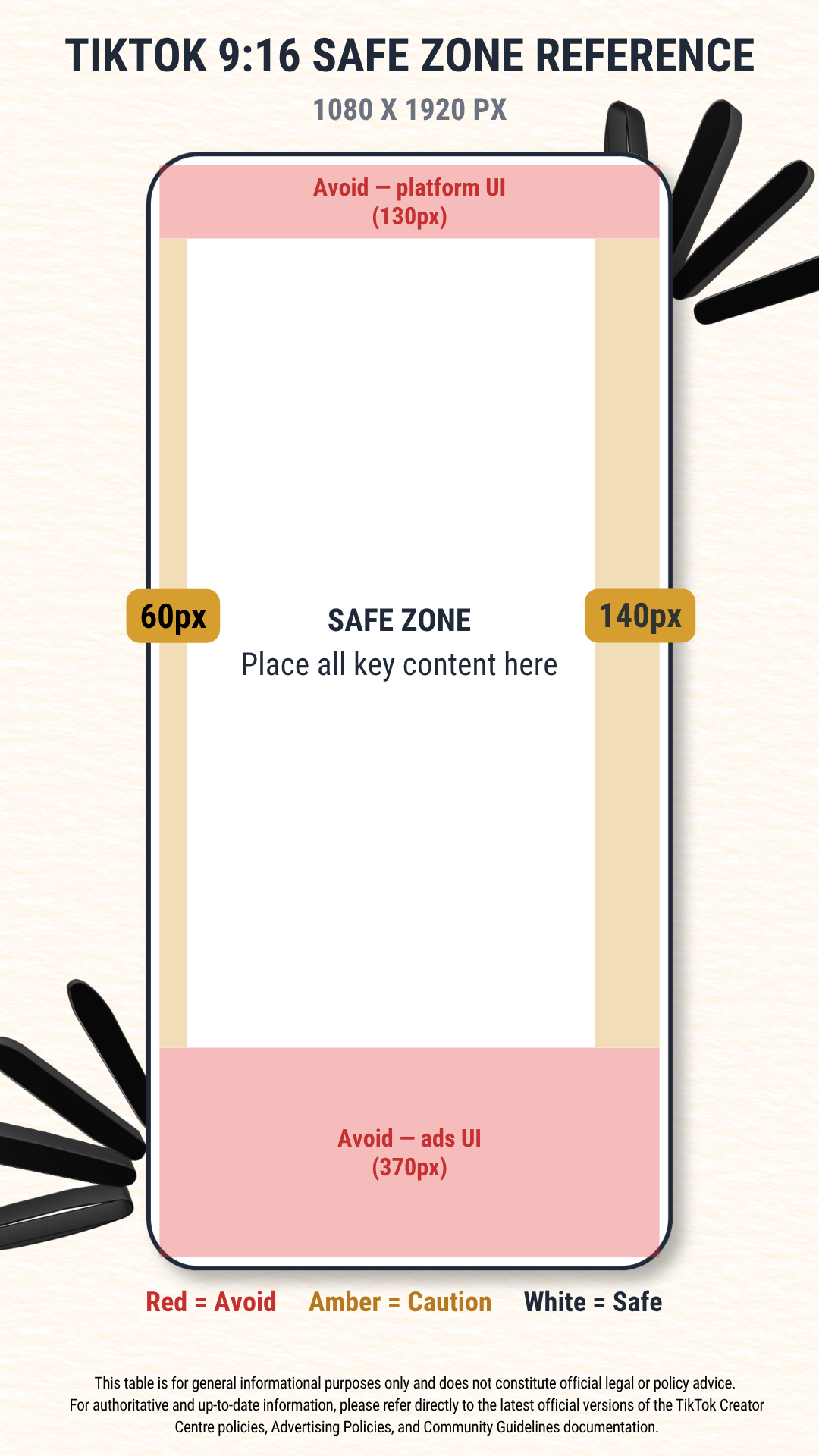
TikTok doesn't give you one fixed number here. It publishes downloadable safe zone templates per placement, and the longer your ad caption, the smaller your safe zone gets. On a 1080×1920 frame, treat these measurements as a floor (they're the same ones I used in the specs breakdown):
✅ Nothing important in the bottom 483px - that's where the account name, caption and CTA button sit
✅ Nothing critical in the top 130px
✅ Right edge: keep 140px clear for the like, comment and share buttons
✅ Left edge: 64px of breathing room
✅ All text readable on a 6-inch mobile screen at 9:16
If your layout is tight, download TikTok's template for your placement from the in-feed spec page above and check against that instead. The reference graphic below is a rough guide only.
Gate 3: Legal and Brand Sign-Off - Fresh Eyes on the Finished Creative 👀

Owner: Legal / Compliance Officer or Senior Strategist
When: After creative production, before upload
This is where the finished creative gets a proper, fresh-eyes review against policy. If you don't have a dedicated legal function - totally fine - this gate can be handled by whoever is most policy-literate on the team.
The one rule: it must be someone other than the person who created the content. You cannot be the only pair of eyes on your own work and call it a sign-off.
What Does the Sign-Off Review Need to Cover?
Claim audit: Read every single word - voiceover script, on-screen text, caption. For each claim:
- Is it prohibited under TikTok's policy for this product category?
- Is it substantiated? Can you produce the evidence if TikTok asks during an appeal if your ad gets flagged?
- Does it match exactly what the landing page says? No drift, no upsell language the ad didn't mention. If there is a mismatch between AD vs Landing Page - sadly you might get flagged.
✏️ Category documentation: For regulated categories - financial services, health, supplements, legal services - are the required certifications, disclaimers, or licences attached and current?
✏️ Competitor and brand safety: Does the ad reference a competitor? Does any imagery risk being read as negative toward another brand or individual? (Anti-discrimination policy applies here - it's broader than people assume)
✏️ Branded content check: Is this ad part of a creator collaboration? If yes, is the Branded Content toggle confirmed in the upload plan? Branded content rules vary by market and TikTok's page gets updated, so give our branded content breakdown a read before you sign off.
Gate 4: Upload Compliance - Slow Down Right Here ✅

Owner: Media Buyer
When: During ad upload in TikTok Ads Manager
This is the gate where the most avoidable last-minute rejections happen - because it's where people are sprinting to hit a launch deadline and skipping steps.
We get it. Deadlines are real.
But these checks take five minutes. The rejections they prevent take 24–48 hours to come back from.
What Needs to Be Verified Before You Hit Submit? 🤔
◻ Video file matches approved spec - resolution, format, duration, file size
◻ Ad copy (headline and description) matches the approved sign-off version exactly - no "small tweaks" at upload
◻ Landing page URL is live, tested on mobile, and matches the ad's promises
◻ If AI-generated content: AIGC toggle ("This ad contains AI-generated content") is enabled - not assumed to carry over from a previous campaign. TikTok's own help page confirms it resets whenever you create or duplicate a campaign, and that the toggle doesn't apply to Spark Ads (those follow the organic AI label rules)
◻ If creator partnership: Branded Content toggle is on and the correct label is selected
◻ Music/audio source confirmed as CML - or licence documentation is attached to the asset record
◻ Targeting settings reviewed: age restrictions, geo-restrictions, category-specific limits all applied
◻ For regulated categories: documentation is on file and accessible for review if challenged
◻ Ad group name includes a version reference - makes tracking and appealing specific creatives much easier
What Happens After You Submit?
Confirm the ad status shows "Pending" or "In Review" - not sitting in "Draft." Set a 24-hour calendar alert.
If it's not approved within 48 hours, check for rejection notifications before assuming it's still in the queue.
📊 TikTok’s own review checklist
Gate 5: Post-Launch Monitoring - Compliance Doesn't Stop at Upload ☑️

Owner: Media Buyer / Account Manager
When: 48 hours and 7 days after launch
Here's the thing people forget: TikTok's moderation system can flag ads days after they've been running.
Music licences get pulled.
Policy updates land mid-campaign.
A landing page quietly changes. You won't always get a notification.
This is why you check.
⏰ 48-Hour Check
◻ Ad is delivering normally - no delivery restrictions or "Limited" status
◻ Account Health tab still showing "Good"
◻ No new violation notifications in the notification centre
⏰ 7-Day Check
◻ CML tracks in active campaigns are still showing as licensed in the library
◻ No new TikTok policy updates in the last week that could affect live campaigns (TikTok's 2026 ad policy change log is the quickest place to check)
◻ Landing page is still live and content-consistent with the ad
◻ For AI avatar campaigns: platform detection hasn't triggered additional review
Stay Ahead of the Policy Curve - Your Account Depends on It 🤙
TikTok's policies don't take a break, and neither should your compliance process. If this workflow gave you a lightbulb moment, there's a whole series of deep-dives waiting for you in our All Articles section.
Hit subscribe and we'll land the compliance intel directly in your inbox every time a new guide drops - no doom-scrolling through 100 pages of policy documentation required.
And if you're at the point where you'd rather have an expert run the audit for you - we've got you. First Review specialises in TikTok compliance audits built specifically for creators and agencies who have real money on the line.
Implementation-ready, policy-grounded, and priced to pay for itself the moment it prevents one violation.
Get in touch and let's talk about your account.
Frequently Asked Questions
What is a pre-upload compliance workflow for TikTok ads?
A structured review process with five checkpoints - creative brief, production, legal/brand sign-off, upload, and post-launch monitoring - that catches policy violations before a creative ever reaches TikTok's review queue instead of fixing rejections after the fact.
Who should review a TikTok ad before it goes live?
Someone other than the person who created it. A single pair of eyes on your own work doesn't count as a compliance sign-off - claim language, category documentation, and branded content disclosure all need a second reviewer.
Does TikTok ad compliance monitoring stop once an ad is approved?
No. TikTok's moderation system can flag ads days after they've started running - music licences get pulled, policies update mid-campaign, or landing pages change. A 48-hour and 7-day post-launch check catches these.
What's the most common cause of TikTok ad rejections?
TikTok doesn't publish a ranking of rejection causes, so this is my read from client work rather than an official number. The rejections I see most often aren't prohibited content. They're process gaps during upload, like a skipped AIGC toggle or an unconfirmed branded content disclosure.
Two gates in this workflow deserve their own deep dive: Gate 2's format checks get the full breakdown in the 2026 spec sheet for resolution, aspect ratio and file format, and Gate 3's disclosure checks are covered properly in our AIGC disclosure guide and our branded content policy breakdown.
Last reviewed: 25 October 2026. Every link in this post points to TikTok's own pages or to other posts on this site.
This article reflects TikTok's official policy guidelines as published at the time of writing. TikTok updates its policies regularly, so always refer to the TikTok Advertising Policies page for the latest information. First Review accepts no liability for changes made after publication.


